
Updated: November 12, 2026 | Markets: United States and Canada | Audience: CIOs, cloud architects, infrastructure managers and enterprise IT procurement teams
Quick Answer: Which Enterprise Cloud Migration Tool Is Best?
The best enterprise cloud infrastructure migration tool depends on your destination platform, existing infrastructure and downtime requirements.
AWS Transform MGN is a strong choice for rehosting servers on AWS. Azure Migrate is suitable for discovering, assessing and migrating workloads into Microsoft Azure. Google Cloud Migrate to Virtual Machines is designed for moving supported virtual machines into Google Cloud.
For VMware-to-VMware mobility, evaluate VMware HCX. For migration to Nutanix infrastructure, consider Nutanix Move. Organizations with complex replication and business-continuity requirements should also evaluate specialist products such as Zerto and Carbonite Migrate.
Before purchasing, compare compatibility, recovery requirements, licensing, network transfer costs and the total cost of running workloads after migration.
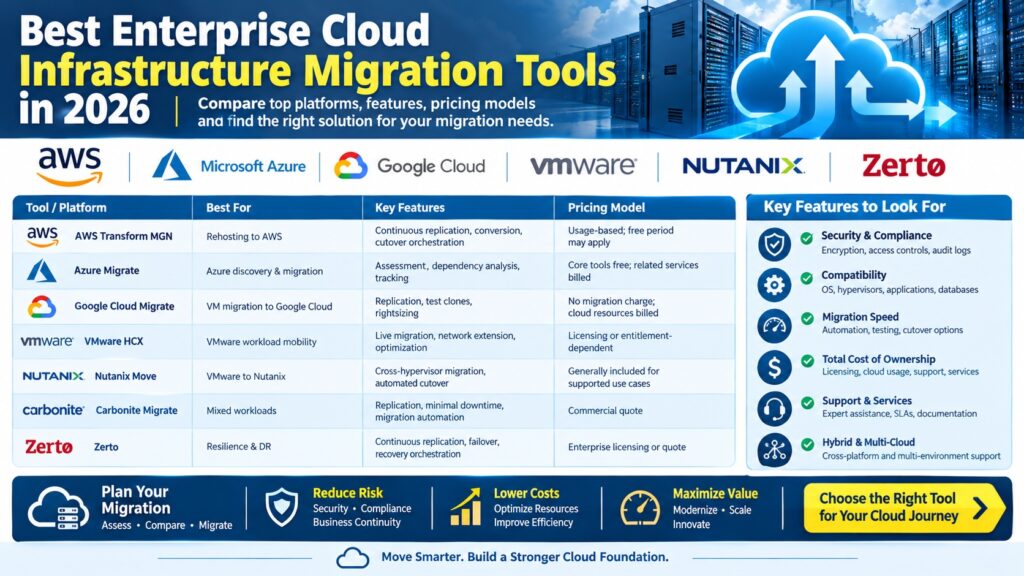
Enterprise Cloud Migration Tools: 2026 Comparison Table
| Tool | Best For | Key Capabilities | Pricing Model |
|---|---|---|---|
| AWS Transform MGN | Server rehosting to AWS | Continuous replication, conversion, cutover orchestration | Migration service terms and AWS resource usage |
| Azure Migrate | Microsoft Azure adoption | Discovery, assessment, dependency analysis, migration tracking | Core tools free; associated services and resources billed |
| Google Cloud Migrate to VMs | VM migration to Google Cloud | Replication, test clones, cutover, rightsizing | No separate migration-service charge; cloud usage billed |
| VMware HCX | VMware hybrid-cloud mobility | Bulk migration, network extension, workload mobility | Entitlement and licensing-dependent |
| Nutanix Move | VMware-to-Nutanix transitions | Cross-hypervisor migration, testing, automated cutover | Check platform entitlements and deployment requirements |
| Carbonite Migrate | Physical, virtual and cloud workload migration | Replication and workload cutover | Commercial quote |
| Zerto | Resilience-focused migration | Continuous replication, failover, recovery orchestration | Enterprise licensing or quote |
Pricing note: Migration software cost is only one component of project spending. Cloud compute, storage, networking, security, support and consulting may be charged separately. Product compatibility and licensing must be confirmed for the specific deployment.
1. AWS Transform MGN — Best for Enterprise Migration to AWS
Best for: Rehosting physical, virtual and cloud-based servers as Amazon EC2 instances.
Official product: AWS Transform MGN
AWS Transform MGN, formerly AWS Application Migration Service, helps organizations migrate workloads to Amazon Web Services without rebuilding every application from scratch.
The service supports continuous block-level replication and automated conversion of supported source systems into EC2 instances.
Important Features
- Migration of supported physical and virtual servers.
- Continuous data replication.
- Automated machine conversion.
- Test launches before production cutover.
- Migration wave coordination.
- Integration with AWS migration workflows.
Advantages: Strong integration with AWS and a structured approach to large-scale server rehosting.
Limitations: AWS-specific destination, compatibility requirements and separate infrastructure consumption charges.
Best buying scenario: A US enterprise migrating hundreds of on-premises Windows and Linux servers into AWS while retaining much of the existing application architecture.
Also Read : Aadhaar Error E-67: Connection Timeout From ASA API
2. Azure Migrate — Best for Microsoft-Centric Enterprises
Best for: Organizations moving VMware, Hyper-V, physical servers and supported applications into Azure.
Official product: Microsoft Azure Migrate
Azure Migrate provides a central platform for infrastructure discovery, migration assessment and progress tracking.
It is particularly relevant to businesses using Microsoft server products, Active Directory, SQL Server and existing Azure services.
Important Features
- Infrastructure discovery and inventory.
- Cloud readiness assessments.
- Application dependency analysis.
- Azure cost estimation and rightsizing.
- Migration tracking and planning.
- Integration with Microsoft and third-party migration solutions.
Azure Migrate can help teams determine which workloads should be rehosted, modernized, replaced or retired.
Advantages: Assessment capabilities, Microsoft ecosystem integration and centralized project visibility.
Limitations: Actual migration workflows may require additional Azure services, agents, appliances or partner tools.
See Azure Migrate pricing for current service terms.
3. Google Cloud Migrate to Virtual Machines — Best for Google Cloud VM Migration
Best for: Rehosting supported on-premises and other cloud virtual machines to Google Compute Engine.
Official product: Google Cloud Migrate to Virtual Machines
Google Cloud Migrate to Virtual Machines provides managed migration workflows for supported virtual machine sources.
Its capabilities include replication, test cloning, migration cutover and VM rightsizing recommendations.
Important Features
- VM migration from supported VMware and cloud environments.
- Managed disk replication.
- Pre-migration validation and test clones.
- Migration grouping and automation.
- Destination resource recommendations.
- Integration with Google Cloud Migration Center.
Pricing: Google Cloud states that the migration service itself is provided without a separate charge for migrations into Google Cloud. Compute Engine, storage and network resources consumed during testing and operation are billed normally.
Advantages: Clear service pricing and integrated testing capabilities.
Limitations: Destination-specific functionality and potential source-cloud egress charges.
4. VMware HCX — Best for VMware Workload Mobility
VMware HCX is designed for workload mobility and connectivity across compatible VMware environments.
It can be useful when an enterprise needs to move large groups of virtual machines while preserving familiar VMware operating models.
Important Features
- Bulk workload migration.
- Supported live-migration capabilities.
- Network extension.
- WAN optimization in supported configurations.
- Migration orchestration.
Actual migration methods, licensing and supported source/destination combinations depend on the VMware deployment.
Not every VMware software appliance is supported for HCX migration. Check current Broadcom documentation before planning a migration.
Best buying scenario: A company consolidating VMware data centers or moving compatible workloads to a VMware-based cloud environment.
5. Nutanix Move — Best for VMware-to-Nutanix Migration
Best for: Enterprises adopting Nutanix Cloud Platform or migrating supported virtual workloads.
Official product: Nutanix Move
Nutanix Move simplifies the transfer of supported virtual machines to Nutanix environments.
It supports migration planning, workload preparation, data synchronization and controlled cutover.
Important Features
- Cross-hypervisor migration workflows.
- Migration of individual or grouped workloads.
- Pre-cutover testing.
- Network mapping.
- Automated final synchronization and cutover.
- API-based automation.
In October 2026, Nutanix described new DirectPath capabilities in Move 6.3.3 for supported VMware migration scenarios.
Advantages: Useful for organizations transitioning away from existing VMware infrastructure.
Limitations: Supported migration paths, versions and target platform requirements must be validated.
6. Carbonite Migrate — Best for Mixed Workload Migration
Carbonite Migrate is a commercial workload migration product associated with OpenText’s infrastructure portfolio.
It is designed for supported physical, virtual and cloud migration scenarios using replication-based workflows.
Features to Evaluate
- Supported operating systems and hypervisors.
- Continuous replication capabilities.
- Cutover and rollback procedures.
- Physical-to-virtual and virtual-to-virtual support.
- Licensing by workload or migration project.
- Professional support availability.
Best buying scenario: An enterprise with heterogeneous infrastructure that cannot be migrated using only a destination cloud provider’s native tools.
Request current product documentation and a commercial quote before selecting this platform.
7. Zerto — Best for Resilience-Focused Workload Mobility
Zerto, part of Hewlett Packard Enterprise, is associated with continuous data protection, disaster recovery and workload mobility.
It is especially relevant when a migration project must be evaluated alongside business-continuity and recovery requirements.
Features to Evaluate
- Continuous replication.
- Recovery orchestration.
- Failover and failback workflows.
- Supported hypervisors and cloud targets.
- Recovery point and recovery time objectives.
- Enterprise licensing and support.
Best buying scenario: A regulated or mission-critical organization that wants migration planning aligned with disaster recovery.
Check current destination support and licensing directly with HPE Zerto.
Feature Comparison: Which Tool Supports Your Requirements?
| Requirement | Tools to Evaluate First | Why |
|---|---|---|
| Migration to AWS EC2 | AWS Transform MGN | AWS-native server rehosting |
| Migration to Azure | Azure Migrate | Discovery, assessment and Azure workflows |
| Migration to Google Compute Engine | Google Cloud Migrate to VMs | Managed VM migration and testing |
| VMware-to-VMware mobility | VMware HCX | Compatible workload and network migration |
| VMware-to-Nutanix | Nutanix Move | Cross-hypervisor transition |
| Mixed physical and virtual systems | Carbonite Migrate, AWS Transform MGN | Supported heterogeneous source workloads |
| Business-continuity-focused migration | Zerto | Replication and recovery workflows |
These are starting points for technical evaluation, not universal compatibility guarantees.
How Much Does Enterprise Cloud Migration Cost?
Migration cost includes more than the software license.
Organizations should account for discovery, engineering, data transfer, testing, security, business disruption and ongoing cloud consumption.
Illustrative 100-Server Migration Budget
Consider a hypothetical company migrating 100 virtual servers to a public cloud.
| Cost Component | Illustrative Amount (USD) |
|---|---|
| Discovery and assessment | $8,000 |
| Migration engineering | $25,000 |
| Testing and validation | $12,000 |
| Network and transfer costs | $5,000 |
| Security and compliance review | $10,000 |
| Contingency | $9,000 |
| Total illustrative project cost | $69,000 |
Important: These figures are invented planning assumptions for demonstrating budget structure, not market quotations or typical vendor prices. The example excludes destination cloud operating costs, separately licensed software and applicable taxes.
Calculate Your Own Migration Cost
Use the following formula:
Total Migration Budget = Assessment + Migration Labor + Software + Data Transfer + Testing + Security + Contingency
For an accurate enterprise estimate, collect source-server specifications, storage volumes, network requirements, application dependencies and proposed destination instance sizes.
Cloud Migration ROI: Worked Example
Suppose an enterprise estimates its current infrastructure costs at $420,000 annually.
After migration, its projected cloud infrastructure, software and operational costs total $330,000 annually.
The projected recurring savings are:
$420,000 − $330,000 = $90,000 per year.
If the one-time migration project costs $180,000, the simple payback period would be:
$180,000 ÷ $90,000 = 2 years.
This example is hypothetical. Real ROI calculations should include contract commitments, staff costs, decommissioning expenses, security controls, backup, disaster recovery and expected growth.
Migration does not automatically reduce spending. Poorly sized instances, excessive storage and network egress can increase costs.
How to Choose Enterprise Cloud Migration Software
1. Inventory Existing Infrastructure
Document servers, operating systems, applications, databases, storage, networks and business owners.
Include applications that depend on older operating systems or proprietary hardware.
2. Map Application Dependencies
Identify relationships between web servers, application servers, databases, identity systems and external services.
Moving a single VM without its dependencies can cause application failures.
3. Define Migration Objectives
Decide whether the project is intended to reduce costs, leave a data center, improve resilience, modernize applications or meet regulatory requirements.
Different objectives may require different migration methods.
4. Establish Downtime Requirements
Set recovery time objectives, recovery point objectives and acceptable cutover windows for each workload.
Do not interpret vendor claims of minimal downtime as guarantees of zero interruption.
5. Evaluate Security and Compliance
Review encryption, identity access, audit logging, data residency and applicable compliance requirements.
US and Canadian organizations should evaluate their specific contractual and regulatory obligations rather than assuming all cloud regions provide identical compliance coverage.
6. Run a Proof of Concept
Choose a representative, lower-risk workload and test the complete migration process.
Measure replication time, application behavior, connectivity, operational costs and rollback procedures.
7. Compare Total Cost of Ownership
Include migration software, cloud consumption, support, professional services and the cost of operating both environments during transition.
Enterprise Cloud Migration Procurement Checklist
| Vendor Evaluation Question | Evidence to Request |
|---|---|
| Are our operating systems supported? | Current compatibility matrix |
| Can the tool meet our downtime target? | Test results and migration methodology |
| Does it support our source hypervisor? | Supported source/destination documentation |
| What does licensing include? | Itemized written quote |
| Are there extra data transfer charges? | Cloud pricing estimate |
| What support is available during cutover? | Support agreement and escalation process |
| Can we test rollback? | Documented recovery procedure |
| How are credentials and data protected? | Security architecture and access controls |
| Can the tool migrate in waves? | Automation and orchestration demonstration |
| What happens after migration? | Decommissioning and operational handover plan |
Cloud Migration Tools vs Managed Migration Services
Some enterprises purchase migration software and complete the work internally.
Others hire a managed service provider, cloud consulting firm or systems integrator to plan and execute the project.
A managed migration engagement may include application discovery, architecture design, security reviews, migration execution, testing and operational handover.
Professional services may be worthwhile when internal teams lack migration capacity or when complex workloads require specialized expertise.
When requesting quotes, distinguish the software subscription from engineering labor, cloud resource consumption and post-migration support.
Common Enterprise Cloud Migration Mistakes
- Migrating every workload without evaluating retirement or modernization.
- Failing to map application dependencies.
- Underestimating network bandwidth requirements.
- Ignoring data egress and temporary storage costs.
- Skipping migration rehearsal and rollback testing.
- Assuming the migration tool automatically provides disaster recovery.
- Neglecting software license portability.
- Failing to remove unused infrastructure after cutover.
- Not validating performance under real production traffic.
- Choosing a vendor based only on a low initial software price.
Frequently Asked Questions
What are enterprise cloud infrastructure migration tools?
They are software platforms and services that help organizations discover, assess, replicate, transfer and validate infrastructure workloads when moving between data centers, cloud platforms or virtualization environments.
Which cloud migration tool is best for AWS?
AWS Transform MGN is a primary option for rehosting supported servers into AWS EC2. Other tools may be needed for databases, containers and application modernization.
Is Azure Migrate free?
Microsoft provides core Azure Migrate capabilities without a separate charge, but related Azure services, partner tools and consumed infrastructure may incur costs.
Does Google Cloud charge for VM migration?
Google Cloud states that Migrate to Virtual Machines has no separate migration-service charge for migrations into Google Cloud. Compute, storage, networking and source-cloud charges may still apply.
What is the difference between VMware HCX and Nutanix Move?
VMware HCX focuses on compatible VMware workload mobility and hybrid connectivity. Nutanix Move focuses on supported migrations into Nutanix environments, including cross-hypervisor scenarios.
Can enterprise migration tools reduce downtime?
Many support continuous replication, testing and coordinated cutover. Actual downtime depends on workload behavior, network capacity and the migration design.
Can I migrate 1,000 servers automatically?
Large migrations can be organized into waves and automated to varying degrees, but application validation, dependency planning and operational approvals still require attention.
How long does enterprise cloud migration take?
Duration varies widely with infrastructure size, application complexity, network capacity and business requirements. A reliable timeline requires a workload assessment.
Are cloud migration tools secure?
Security depends on product configuration, identity controls, encryption, network design and operational practices. Request current vendor security documentation.
What is the best tool for hybrid cloud migration?
The answer depends on source and destination compatibility. VMware HCX, Nutanix Move and specialist replication platforms are worth evaluating for supported hybrid scenarios.
Should enterprises use cloud-native or third-party migration tools?
Cloud-native tools are often attractive for migration into a single provider. Third-party tools may be useful for heterogeneous environments, specialized replication or resilience requirements.
How do I compare enterprise migration vendor quotes?
Normalize licensing, workload counts, included services, support, migration duration and cloud resource assumptions. Compare total project cost rather than license fees alone.
Official Vendor Sources
- AWS — Transform MGN
- Microsoft — Azure Migrate
- Microsoft — Azure Migrate Pricing
- Google Cloud — Migrate to Virtual Machines
- Google Cloud — Migration Pricing
- Nutanix — Move
- HPE — Zerto
Related Enterprise Technology Guides
Explore more business software and technology news and technology articles on 1000 Science Fair Projects.
Final Verdict: Best Enterprise Migration Tools
- Best for AWS: AWS Transform MGN.
- Best for Azure: Azure Migrate.
- Best for Google Cloud: Migrate to Virtual Machines.
- Best for VMware mobility: VMware HCX.
- Best for Nutanix adoption: Nutanix Move.
- Best for mixed workloads: Evaluate Carbonite Migrate.
- Best for resilience-oriented migration: Evaluate Zerto.
For most enterprises, the right starting point is a documented infrastructure assessment followed by a pilot migration and a written total-cost comparison.
Editorial methodology: This guide compares publicly documented product capabilities and pricing models reviewed in November 2026. Recommendations are scenario-based editorial assessments, not claims of hands-on testing or guaranteed performance. Hypothetical cost examples are clearly identified. Product capabilities and commercial terms may change.



Pingback: Lincoln Bragg Error Code: Timed Out Waiting for Publisher Variables