
Updated: November 13, 2026 | Service: Annual Pension Life Certificate | Country: India
Quick Answer: How to Submit a Life Certificate Through VLC
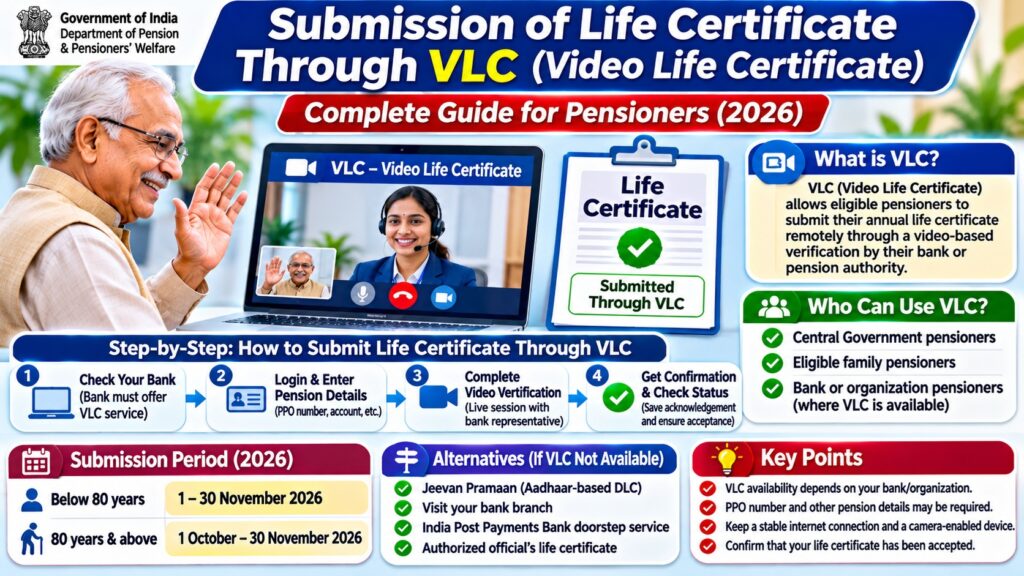
Submission of Life Certificate through VLC means completing the annual pension life certificate verification through a bank’s or pension authority’s approved Video Life Certificate service.
- Check whether your pension-disbursing bank offers VLC.
- Open the bank’s official pension portal or application.
- Choose the available Video Life Certificate service.
- Provide the required pension details.
- Complete the live video verification process.
- Save the acknowledgement or reference number.
- Check whether the life certificate has been accepted.
Note: There is no single universal VLC application for all Central Government pensioners. Each participating bank or pension authority determines its own process.
What Is VLC in Pension Life Certificate Submission?
VLC stands for Video Life Certificate.
It is a method through which a pensioner can establish that they are alive without necessarily visiting a pension-disbursing bank branch.
Instead of completing an in-person verification, the pensioner participates in a video session arranged through the authorized service provider.
The bank or pension authority verifies the pensioner’s identity using its approved procedure and processes the annual life certificate.
Video-based verification is particularly useful for elderly pensioners, people with mobility difficulties and pensioners who live far from their pension-disbursing branch.
However, not every bank offers the same video verification facility.
Who Can Submit a Life Certificate Through VLC?
Eligibility depends on the institution providing the service.
Potential users may include:
- Central Government pensioners whose pension-disbursing bank supports VLC.
- Eligible family pensioners.
- Retired employees covered by an organization’s dedicated pension system.
- Bank staff pensioners where an internal VLC facility is available.
- Other pensioners expressly permitted by their pension-disbursing institution.
For example, State Bank of India issued an October 30, 2025 notice describing a Video Life Certificate facility through HRMS for its staff and family pensioners.
That facility should not be confused with a universal VLC service for every SBI customer receiving a government pension.
Also Read : Khel Maharan 3.0 Registration 2026–27
How to Submit Life Certificate Through VLC Online
Step 1: Check Your Pension-Disbursing Bank
First, identify the bank or institution responsible for paying your pension.
Visit its official website and look for pensioner services, life certificate submission or video verification.
If no VLC option is displayed, contact the bank through its published customer support channels.
Step 2: Open the Authorized VLC Facility
Where supported, open the bank’s official pension portal or application.
Some institutions provide a dedicated pensioner login, while others arrange video verification through their customer service system.
Do not use video meeting links received from unknown callers or unofficial websites.
Step 3: Enter the Required Pension Information
The bank may request information needed to locate and verify your pension record.
Depending on the provider, this may include:
- Pension Payment Order (PPO) number.
- Pension account details.
- Registered mobile number.
- Date of birth.
- Other identity information required by the institution.
The exact fields vary by bank. A PPO number alone does not guarantee that video verification can be initiated.
Step 4: Complete the Video Verification
Follow the instructions provided by the authorized bank representative.
The pensioner may be asked to:
- Allow camera and microphone access.
- Show their face clearly during the live session.
- Confirm their identity and pension details.
- Complete any additional checks required by the bank.
Use a well-lit location with a stable internet connection.
Never disclose banking passwords, card PINs or OTPs to a person during a video call.
Step 5: Obtain Confirmation
After verification, the institution may provide an acknowledgement, transaction reference or status message.
Save any confirmation provided through the official channel.
Do not assume that the life certificate has been accepted simply because the video call ended.
Step 6: Check the Submission Status
Review the pension portal or contact your pension-disbursing agency to confirm that the life certificate has been processed successfully.
VLC vs Jeevan Pramaan Digital Life Certificate
Video Life Certificate verification and Jeevan Pramaan are two different ways of fulfilling pension life certificate requirements.
| Feature | Video Life Certificate (VLC) | Jeevan Pramaan (DLC) |
|---|---|---|
| Verification method | Provider-managed video identification | Aadhaar-based biometric or supported face authentication |
| Service provider | Participating bank or pension institution | Jeevan Pramaan system |
| Live bank representative | May be required | Not generally required for self-service generation |
| PPO details | May be required | Required pension information |
| Pramaan ID | Not necessarily generated | Generated after successful authentication |
| Availability | Depends on institution | Available to eligible pensioners of participating authorities |
| Certificate processing | Through the institution’s system | Shared electronically with the pension-disbursing agency |
Key difference: Jeevan Pramaan face authentication uses a supported mobile application to authenticate the pensioner. It should not be described as the same process as a bank’s live video verification facility.
Life Certificate Submission Dates for 2026
Central Government pensioners generally submit their annual life certificates during November.
Under the special provision for pensioners aged 80 years and above, submission can begin on October 1.
| Pensioner Category | 2026 Submission Window |
|---|---|
| Central Government pensioners below 80 years | November 1–30, 2026 |
| Central Government pensioners aged 80 years or above | October 1–November 30, 2026 |
| Other pension schemes | Follow the relevant pension authority’s rules |
These dates reflect the general Central Government annual life certificate schedule. Individual pension arrangements may have additional instructions.
Pensioners should complete the required submission within the applicable period to avoid potential interruption in pension disbursement.
Documents and Details Required for VLC
Before starting a video verification session, keep the information requested by your bank ready.
| Item | Purpose |
|---|---|
| PPO number | Identify the pension record |
| Pension account details | Match the disbursing account |
| Registered mobile number | Communication and verification |
| Identity document | Where required by the provider |
| Camera-enabled device | Participate in the video session |
| Internet connection | Support uninterrupted verification |
The actual requirements depend on the VLC provider. Do not upload documents to an unverified website.
Submission of Life Certificate Through VLC in SBI
State Bank of India has documented a Video Life Certificate submission facility through its HRMS system for eligible staff pensioners and family pensioners.
In its October 30, 2025 circular, SBI described VLC through HRMS as one of the available methods of annual life certificate submission.
The notice also referred to the importance of maintaining the pensioner’s photograph in HRMS and to an accompanying user manual.
Eligible staff pensioners should consult their official HRMS portal or the relevant SBI pension administration department for the current procedure.
Other SBI pension customers should check the bank’s currently available pensioner verification services rather than assuming they can access the staff HRMS facility.
What If Your Bank Does Not Offer VLC?
If your pension-disbursing bank does not offer video-based verification, you may have other options.
Option 1: Jeevan Pramaan Face Authentication
Eligible pensioners can generate a Digital Life Certificate using the official Jeevan Pramaan mobile application and supported Aadhaar face authentication.
Visit jeevanpramaan.gov.in for the official application and instructions.
Option 2: Submit Through a Bank Branch
Pensioners may submit their annual life certificate by personally appearing before the pension-disbursing bank, subject to the applicable procedure.
Option 3: Use India Post Payments Bank Doorstep Service
India Post Payments Bank and postal delivery staff provide doorstep Digital Life Certificate generation services for eligible pensioners.
Government announcements have described a service charge of Rs. 70 for this facility. Confirm the current charge and availability before booking.
Option 4: Use an Authorized Official’s Certificate
Central Government pension rules also recognize life certificates signed by specified authorized officials, subject to the applicable requirements.
Check with your pension-disbursing agency for the accepted format and procedure.
VLC Not Working? Common Problems and Fixes
| Problem | Possible Reason | What to Do |
|---|---|---|
| VLC option not visible | Service not offered or not enabled for the account | Contact the pension-disbursing institution |
| Video call not connecting | Internet or service interruption | Check connectivity and retry through the official portal |
| Camera not working | Permission or device problem | Enable camera access and restart the browser |
| Microphone not working | Permission or hardware issue | Check microphone settings |
| PPO not recognized | Incorrect or unmatched pension record | Verify PPO details with the bank |
| Verification unsuccessful | Identity or pension information could not be confirmed | Follow the provider’s instructions |
| No acknowledgement received | Processing delay or incomplete submission | Check official status before retrying |
How to Confirm That Your Life Certificate Was Accepted
After submitting through VLC, check the acknowledgement or status service offered by your pension-disbursing bank.
If no online status is available, contact the bank’s pension department.
For certificates generated through Jeevan Pramaan, the pensioner can use the official portal to retrieve the certificate with the generated Pramaan ID.
Remember that a bank’s VLC reference number is not necessarily a Jeevan Pramaan ID.
Safety Tips for Video Life Certificate Submission
Protect your pension and banking information:
- Use only your bank’s official website or application.
- Do not join unsolicited video verification links.
- Never disclose your net banking password or ATM PIN.
- Never install remote-control applications at a caller’s request.
- Do not pay unofficial agents claiming guaranteed VLC approval.
- Confirm submission status through an authorized channel.
Frequently Asked Questions
What is VLC in life certificate submission?
VLC stands for Video Life Certificate. It is a video-based identity verification method offered by certain banks or pension institutions for annual life certificate submission.
Can Central Government pensioners submit a life certificate through VLC?
Eligible Central Government pensioners may use VLC where their pension-disbursing bank or authority offers and accepts the service.
Is VLC available on JeevanPramaan.gov.in?
Jeevan Pramaan provides Aadhaar-based Digital Life Certificates, including supported face authentication. A bank-operated VLC video session is a separate service.
Is a PPO number required for VLC?
The pension-disbursing institution may require the PPO number to identify the pensioner. Requirements vary by provider.
Can I submit a life certificate through VLC from home?
Yes, where the bank offers remote video verification and the pensioner meets its eligibility and technical requirements.
Do I need a biometric fingerprint scanner for VLC?
A provider-managed video verification service does not necessarily require a fingerprint scanner. The bank’s procedure determines the requirements.
Can family pensioners use VLC?
Some providers allow eligible family pensioners to use VLC. For example, SBI has documented a staff and family pensioner VLC facility through HRMS.
What is the last date for Central Government life certificate submission in 2026?
The general annual submission window is November 1–30, 2026. Pensioners aged 80 and above may submit from October 1.
What happens if my VLC verification fails?
Contact the bank or pension authority for the reason. You may need to retry through the approved process or use another accepted submission method.
How do I check VLC submission status?
Use the acknowledgement or status facility provided by your pension-disbursing institution. Contact its pension department if no online status is available.
Is VLC the same as Jeevan Pramaan face authentication?
No. VLC generally involves a provider-managed video identification process, while Jeevan Pramaan face authentication uses the approved Aadhaar-based mobile authentication system.
What if my pension bank does not support VLC?
Check whether you can use Jeevan Pramaan, an authorized bank branch, an eligible doorstep service or another method accepted by your pension authority.
Official Sources and Useful Links
- Jeevan Pramaan — Government of India
- Department of Pension and Pensioners’ Welfare
- CPAO — Pensioners’ Information and Life Certificate Guidance
- Press Information Bureau — Doorstep Digital Life Certificate Service
- SBI — Annual Life Certificate Circular, October 2025
Related Pension Guides
Read more pension and government service tutorials at 1000sciencefairprojects.com/tech.
TL;DR: Submission of Life Certificate Through VLC
- VLC: Video Life Certificate.
- Purpose: Remote annual pension life verification.
- Availability: Depends on the pension-disbursing institution.
- Required details: May include PPO number, pension account and identity information.
- 2026 submission: Generally November for Central Government pensioners; from October 1 for those aged 80 and above.
- Alternative: Jeevan Pramaan Digital Life Certificate using Aadhaar authentication.
- Final step: Confirm acceptance through the authorized pension-disbursing agency.
Bottom line: VLC can help eligible pensioners submit their life certificate without visiting a bank branch. However, pensioners must use the approved service offered by their own pension-disbursing institution and verify that the submission was accepted.
Editorial note: Reviewed November 13, 2026 using Government of India pension guidance, CPAO information, official Jeevan Pramaan resources and SBI’s published staff pensioner VLC circular. VLC eligibility and procedures vary by provider. This is an independent informational guide.


Pingback: Jeevan Pramaan Life Certificate Download by PPO Number 2026