
Updated: November 13, 2026 | Service: Digital Life Certificate | Audience: Central Government pensioners
Quick Answer: Can You Download Jeevan Pramaan by PPO Number?
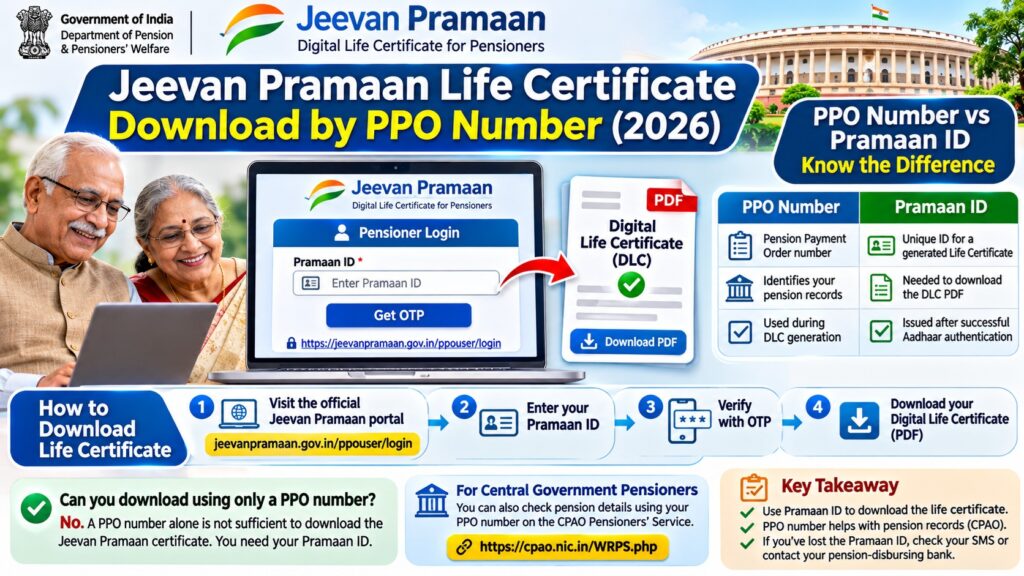
No. A PPO number alone is not sufficient to download a Jeevan Pramaan Digital Life Certificate. The official pensioner download process uses the Pramaan ID generated after successful Aadhaar-based authentication.
If you have your Pramaan ID, visit jeevanpramaan.gov.in/ppouser/login, complete the required verification and download the certificate PDF.
If you only have your Pension Payment Order (PPO) number, check the SMS received when the certificate was generated or contact your pension-disbursing bank for assistance.
Eligible Central Civil Government pensioners can also use the CPAO pensioners’ service to access PPO-related records, but this is not a substitute for the Jeevan Pramaan download portal.
Jeevan Pramaan Life Certificate Download by PPO Number: Official Process
Many Central Government pensioners search for a way to download their life certificate by entering their PPO number.
The confusion arises because the PPO number is required when generating a Digital Life Certificate, while a separate Pramaan ID is issued after authentication.
The official Jeevan Pramaan website explains that pensioners can download a PDF copy using their generated Pramaan ID.
Therefore, pensioners should distinguish between:
- PPO number: Identifies the pension payment order.
- Pramaan ID: Identifies a generated Digital Life Certificate.
- CPAO login: Provides pension records for eligible Central Civil Government pensioners.
How to Download Jeevan Pramaan Life Certificate PDF
Step 1: Open the Official Pensioner Login
Visit the government website:
https://jeevanpramaan.gov.in/ppouser/login
Check that the website address is correct before entering personal details.
Step 2: Enter Your Pramaan ID
Enter the Pramaan ID associated with your previously generated Digital Life Certificate.
This ID is normally provided in the acknowledgement SMS sent after successful certificate generation.
Step 3: Complete Verification
Follow the current verification instructions displayed by the portal.
Where an OTP is required, use the mobile number associated with the certificate.
Never share your OTP with another person.
Also Read : Submission of Life Certificate Through VLC (2026)
Step 4: Access the Certificate
After successful verification, access the available Digital Life Certificate record.
Review the pensioner information and certificate status.
Step 5: Download the PDF
Use the portal’s download option to save the certificate.
You may keep a printed copy for personal records, although the Digital Life Certificate is normally made available electronically to the pension disbursing agency.
What If You Have Only Your PPO Number?
If you have your PPO number but cannot find your Pramaan ID, use the following options.
| Your Situation | Recommended Action |
|---|---|
| You previously generated a life certificate | Check the acknowledgement SMS for your Pramaan ID. |
| You generated it at a bank | Contact the pension-disbursing bank for help locating the certificate record. |
| You generated it at a CSC | Check your receipt or contact the centre. |
| You are a Central Civil Government pensioner | Use CPAO to review eligible PPO-related records. |
| You have never generated a Digital Life Certificate | Generate a new certificate through an approved Jeevan Pramaan method. |
How to Check Central Government Pension Details Using PPO Number
The Central Pension Accounting Office (CPAO) provides a Web Responsive Pensioners’ Service (WRPS) for eligible Central Civil Government pensioners and family pensioners.
The service allows registered users to access pension-related information, including pension profiles, payment records and pension revision orders.
Steps to Use CPAO Pensioners’ Service
- Visit cpao.nic.in.
- Open the Pensioners’ Service or WRPS section.
- If you are a new user, select the registration option.
- Provide your PPO number and the other details requested.
- Complete registration and sign in.
- Access the available pension records and services.
CPAO registration guidance refers to PPO number, date of birth and date of retirement or date of death, as applicable.
CPAO also provides grievance tracking and pension processing information.
Remember: A PPO-based CPAO login does not automatically provide a Jeevan Pramaan PDF download using only the PPO number.
Who Can Use the CPAO PPO Portal?
CPAO primarily handles Central Civil Government pension cases within its jurisdiction.
Its official guidance explains that its pensioner registration service does not cover every Central Government pension category.
| Pension Category | Where to Start |
|---|---|
| Central Civil Government | CPAO pensioners’ service |
| Railway pensioner | Railway pension authority or pension-disbursing agency |
| Defence pensioner | Defence pension authority or applicable defence pension portal |
| Postal pensioner | Postal pension authority or pension-disbursing agency |
| State Government pensioner | Relevant state pension authority |
Pensioners from other categories may still be eligible to generate a Jeevan Pramaan certificate if their pension sanctioning authority participates in the system.
PPO Number vs Pramaan ID: What Is the Difference?
| Feature | PPO Number | Pramaan ID |
|---|---|---|
| Full name | Pension Payment Order number | Jeevan Pramaan certificate identifier |
| Main purpose | Identify pension authorization records | Identify a generated Digital Life Certificate |
| Issued by | Relevant pension authority | Jeevan Pramaan system |
| Used during DLC generation | Yes, as pension information | Generated after successful authentication |
| Used for DLC download | Not sufficient on its own | Yes, through official pensioner login |
| Changes when a new DLC is generated | Not ordinarily | A new Pramaan ID is generated |
How to Find a Forgotten Pramaan ID
Try the following methods:
- Search the SMS inbox on the mobile number used during certificate generation.
- Check saved Jeevan Pramaan acknowledgement messages.
- Look for a printed certificate or acknowledgement receipt.
- Contact the bank or CSC where the certificate was generated.
- Ask your pension disbursing agency for assistance.
When contacting an agency, keep your PPO number and pension account details available for verification through its official process.
Do not share sensitive pension details in public forums or with unsolicited callers.
How to Generate a New Jeevan Pramaan Certificate Using PPO Details
If you have not generated a Digital Life Certificate for the required period, you may need to complete a new authentication process.
Jeevan Pramaan supports eligible pensioners through authorized centres and approved applications.
Option 1: Use Jeevan Pramaan Face Authentication
Compatible mobile devices can use the official Jeevan Pramaan application and AadhaarFaceRd application for face authentication.
- Open jeevanpramaan.gov.in.
- Go to the official application download section.
- Install the approved applications.
- Enter the required pension information, including PPO details.
- Complete the prescribed Aadhaar authentication process.
- Save the generated Pramaan ID.
Face authentication on supported mobile devices does not require an external fingerprint scanner.
Option 2: Visit an Authorized Centre
You can also visit a supported bank branch, Citizen Service Centre, post office or government office that offers Jeevan Pramaan generation.
Bring the documents and details requested by the centre, which may include:
- Aadhaar details.
- PPO number.
- Pension account information.
- Mobile number.
- Relevant pension sanctioning and disbursing authority details.
The operator will guide you through the authorized authentication process.
How to Check Jeevan Pramaan Certificate Status
After generating your Digital Life Certificate, you may want to know whether it has been accepted or rejected.
According to the official Jeevan Pramaan FAQ, pensioners can download the certificate from the portal to review its status.
To check:
- Visit the official pensioner login page.
- Enter the Pramaan ID.
- Complete verification.
- Access or download the certificate.
- Review the available status information.
If the certificate is rejected, contact the pension disbursing agency.
Incorrect PPO details, bank information or pension authority selection may lead to rejection.
Do You Need to Submit the Life Certificate PDF to Your Bank?
The Jeevan Pramaan system allows participating pension disbursing agencies to access generated certificates electronically.
The official FAQ states that pensioners generally do not need to physically submit the same Digital Life Certificate to their bank or pension disbursing agency.
However, it is important to confirm that the certificate has been accepted and follow any additional instructions from the responsible pension authority.
How Long Is a Jeevan Pramaan Certificate Valid?
A Jeevan Pramaan certificate is not valid for life.
Its validity depends on the rules of the pension sanctioning authority.
Once the required validity period ends, the pensioner must generate a new Digital Life Certificate or satisfy the applicable life certificate submission requirements.
A new Digital Life Certificate normally receives a new Pramaan ID.
Jeevan Pramaan Download Problems and Solutions
| Problem | What to Do |
|---|---|
| Only PPO number available | Locate the Pramaan ID through SMS, receipt or pension agency. |
| Pramaan ID forgotten | Check the acknowledgement or contact the generating centre. |
| OTP not received | Check mobile connectivity and follow the portal’s retry instructions. |
| Certificate not found | Verify the ID and contact the relevant support provider. |
| PDF does not download | Check browser downloads and try an updated browser. |
| Certificate rejected | Contact the pension disbursing agency to identify incorrect details. |
| CPAO registration unsuccessful | Confirm eligibility and the PPO details required for registration. |
| Certificate validity ended | Generate a new certificate as required by your pension authority. |
Is It Safe to Download a Life Certificate Online?
Use only the official Jeevan Pramaan portal and approved pension service websites.
Security checklist:
- Never share Aadhaar OTPs or banking passwords.
- Do not enter PPO details on unknown websites.
- Avoid unofficial certificate download apps.
- Do not post screenshots containing pension account details.
- Store downloaded PDF files securely.
- Use official pension agency contacts for assistance.
Frequently Asked Questions
Can I download Jeevan Pramaan life certificate by PPO number?
No. A PPO number alone is not sufficient for the standard Jeevan Pramaan download process. You normally need the Pramaan ID generated after successful authentication.
What is the official Jeevan Pramaan download link?
The official pensioner login is https://jeevanpramaan.gov.in/ppouser/login.
How do I download my Central Government life certificate?
Open the Jeevan Pramaan pensioner login, enter your Pramaan ID, complete verification and download the available PDF.
Can I find my Pramaan ID using my PPO number?
The official public download instructions do not provide a general PPO-only lookup method. Contact the bank or agency that generated the certificate for assistance.
What if I have forgotten my Pramaan ID?
Check the acknowledgement SMS or receipt. You can also contact the authorized centre or pension disbursing agency.
Can CPAO download my Jeevan Pramaan certificate?
CPAO provides pension record services for eligible Central Civil Government pensioners. Jeevan Pramaan certificate retrieval is handled through the Jeevan Pramaan system.
Can I check pension status using a PPO number?
Eligible Central Civil Government pensioners can use CPAO’s WRPS facility for pension-related records and processing status.
Is PPO number the same as Pramaan ID?
No. The PPO number identifies the pension order, while the Pramaan ID identifies a generated Digital Life Certificate.
Can I generate a Digital Life Certificate at home?
Eligible pensioners can use approved Jeevan Pramaan applications on compatible devices and complete the required Aadhaar authentication.
Can I use face authentication instead of fingerprints?
Yes. The official mobile face authentication method is available on supported devices.
Do I need to give the downloaded PDF to my bank?
Jeevan Pramaan certificates are generally made electronically available to participating pension disbursing agencies. Confirm acceptance and follow your pension authority’s instructions.
Does the same Pramaan ID work every year?
No. A new Digital Life Certificate normally generates a new Pramaan ID when the certificate is renewed.
What should I do if my certificate is rejected?
Contact the pension disbursing agency, verify the pension details and generate a corrected certificate if instructed.
Can Railway and Defence pensioners use CPAO?
CPAO’s Central Civil Government pensioner services do not cover all Railway, Defence, Postal and other pension categories. Those pensioners should use their applicable pension authorities.
Official Government Links
- Jeevan Pramaan Official Homepage
- Jeevan Pramaan Pensioner Login and PDF Download
- Jeevan Pramaan Official FAQ
- CPAO Web Responsive Pensioners’ Service
- CPAO Pensioners’ Information
Related Pension and Government Service Guides
Explore additional pension, Aadhaar and government service guides on https://1000sciencefairprojects.com/tech/.
TL;DR: Life Certificate Download Using PPO Details
- PPO number: Used to identify pension records.
- Pramaan ID: Used to download the generated Jeevan Pramaan certificate.
- Download portal: jeevanpramaan.gov.in/ppouser/login
- Central Civil pension records: cpao.nic.in
- Forgot Pramaan ID: Check SMS or contact your pension-disbursing agency.
- New certificate: Generate using an approved Aadhaar authentication method.
- PDF submission: Normally not required separately when electronically available to the pension disbursing agency.
Final answer: Central Government pensioners cannot normally download a Jeevan Pramaan life certificate using only their PPO number. Find the Pramaan ID first, then use the official pensioner login to download the certificate PDF.
Editorial note: Reviewed November 13, 2026 against the official Jeevan Pramaan FAQ and CPAO pensioner service documentation. This is an independent informational guide and is not affiliated with the Government of India.


Pingback: Aadhaar Error E-67: Connection Timeout From ASA API
Pingback: Submission of Life Certificate Through VLC (2026): Video Life Certificate Guide for Pensioners