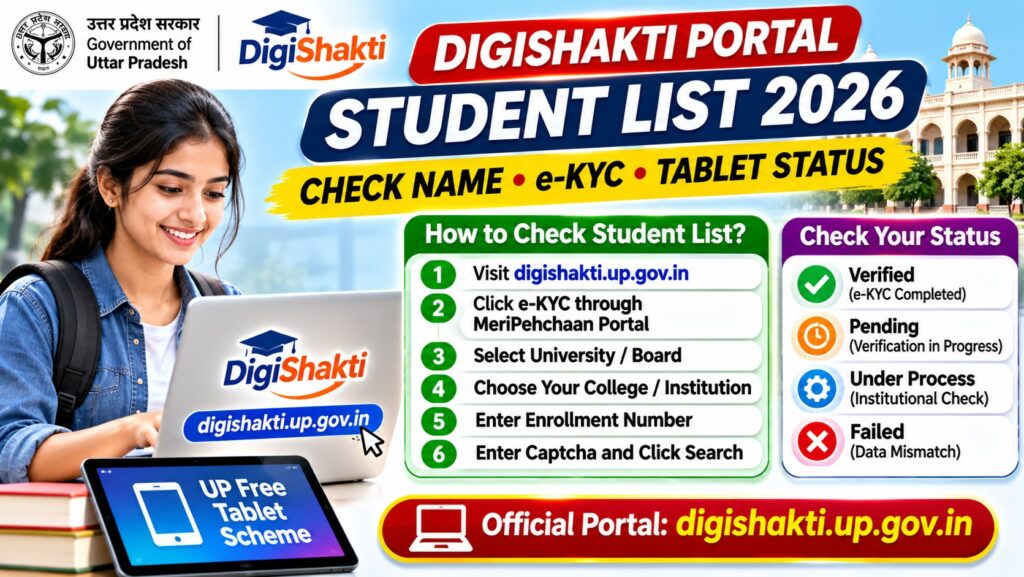

Quick Answer: How to Check DigiShakti Student List 2026
To check your name in the DigiShakti Portal Student List 2026, visit digishakti.up.gov.in and select e-KYC through MeriPehchaan Portal. Choose your university or board, select your college, enter your enrollment number and captcha, and click Search.
Important points:
- Official portal: digishakti.up.gov.in
- Student login: No separate student username or password is issued.
- Student list: Students can search their own records; complete institutional lists are managed by colleges.
- e-KYC: Aadhaar verification is completed through MeriPehchaan when the student record is ready.
- Missing name: Contact your college’s DigiShakti nodal officer.
- Registration fee: Students should not pay third-party websites to be added to the list.
The DigiShakti Portal is used by the Uttar Pradesh government to manage student information, verification and device distribution under the Swami Vivekananda Yuva Sashaktikaran Yojana.
Students searching for the DigiShakti student list, UP free tablet beneficiary list, DigiShakti student login or DigiShakti e-KYC status often want to know whether their college has uploaded their details and whether they are eligible to receive a device.
The process is different from downloading a public merit-list PDF. The DigiShakti system uses institutional uploads and individual student verification.
DigiShakti Portal Student List 2026: Overview
| Particular | Details |
|---|---|
| Portal name | DigiShakti Uttar Pradesh |
| Scheme | Swami Vivekananda Yuva Sashaktikaran Yojana |
| State | Uttar Pradesh |
| Purpose | Student data management, verification and device distribution |
| Student record search | University, college, enrollment number and captcha |
| e-KYC method | MeriPehchaan Aadhaar authentication |
| Student self-registration | Not required |
| Public statewide name list | Not provided as a general downloadable list |
| Official website | digishakti.up.gov.in |
How to Check DigiShakti Portal Student List 2026
Students can check whether their details have been uploaded by following the official student search process.
Step 1: Open the Official DigiShakti Portal
Visit https://digishakti.up.gov.in/ using your mobile phone or computer.
Make sure the website address ends with up.gov.in. Avoid unofficial websites requesting payment or sensitive account information.
Step 2: Select e-KYC Through MeriPehchaan
On the DigiShakti homepage, find the button labeled e-KYC through MeriPehchaan Portal.
Select this option to open the student details search facility.
Step 3: Select Your University or Board
Choose the appropriate institution category from the University/Board/Society/Council dropdown.
Select the university or board under which your college or institution is registered.
Step 4: Choose Your College or Institution
Select your college from the College/Institution dropdown.
If your college does not appear, check that you selected the correct university or board.
Step 5: Enter Your Enrollment Number
Enter the enrollment number used in your institution’s DigiShakti records.
Check the number carefully for:
- Incorrect digits or letters.
- Missing leading zeros.
- Using a roll number instead of the registered enrollment number.
- Choosing the wrong university or college.
Step 6: Enter Captcha and Click Search
Type the captcha displayed on the screen and click Search.
If your student record is available, the portal should display the relevant student information and verification status.
Step 7: Check Your e-KYC Status
Review the status displayed against your student record.
If Aadhaar authentication is pending and the verification option is available, follow the official MeriPehchaan instructions.
If your details are missing or incorrect, contact your college nodal officer instead of repeatedly submitting the same search.
DigiShakti Student List 2026 Direct Link
The official starting point for checking student details is:
Open DigiShakti Portal — Student Details and e-KYC
From the homepage, select e-KYC through MeriPehchaan Portal to reach the student search screen.
This is preferable to relying on unofficial links because the government may change the internal address of its student search page.
DigiShakti Student List Status: Pending, Verified, Failed
After searching your enrollment record, you may see a verification status.
| Status | Meaning | What students should do |
|---|---|---|
| Pending | Student data is available, but Aadhaar e-KYC has not been completed. | Complete e-KYC when the portal permits it. |
| Under Process | The record is still undergoing institutional or departmental verification. | Wait for processing or ask your college nodal officer. |
| Verified | Aadhaar e-KYC has been completed successfully. | Wait for further device distribution instructions. |
| Failed | Authentication may have failed because of a mismatch in student or Aadhaar details. | Contact your institution to identify and correct the mismatch. |
| No Record Found | The record could not be found using the entered details. | Check the enrollment number and college selection, then contact your institution. |
Remember: A verified e-KYC status does not automatically mean a tablet has already been allotted or is ready for collection.
DigiShakti Student List PDF Download 2026
Many students search for terms such as:
- DigiShakti portal student list PDF download.
- UP free tablet student list 2026.
- DigiShakti college-wise beneficiary list.
- DigiShakti student name list.
- DigiShakti tablet distribution list.
However, the official portal does not provide a general public statewide PDF containing every student’s name.
Student records are maintained through colleges, universities and authorised government departments.
Some colleges may publish their own eligible-student lists through official notices, institutional websites or notice boards.
To obtain your college’s list:
- Visit your college’s official website.
- Look for notices about DigiShakti or tablet distribution.
- Check the college notice board.
- Contact the DigiShakti nodal officer.
- Ask whether your enrollment record has been uploaded and verified.
Do not assume that a PDF circulated on WhatsApp or Telegram is an official beneficiary list.
DigiShakti Student Login 2026: Is Login Required?
Students do not receive separate DigiShakti portal login credentials.
According to the official student guidance, student accounts are not created for individual registration or application.
Instead:
- Colleges: Upload and manage student records.
- Universities and boards: Review and approve institutional data.
- Authorised government departments: Complete further verification and processing.
- Students: Search their details and complete the required Aadhaar e-KYC.
Students should not pay anyone for a supposed DigiShakti student login ID or password.
How to Complete DigiShakti e-KYC Through MeriPehchaan
Aadhaar e-KYC is an important verification step in the DigiShakti student process.
The official procedure is documented in a university-hosted DigiShakti user manual.
DigiShakti e-KYC Steps
- Visit the official DigiShakti portal.
- Choose e-KYC through MeriPehchaan Portal.
- Select your university or board.
- Select your college or institution.
- Enter your enrollment number and captcha.
- Click Search to retrieve your record.
- Follow the available Aadhaar authentication instructions.
- Complete the official verification process using the required authentication method.
- Return to the student search page later to check whether the status has updated.
For reference, see the University of Lucknow-hosted DigiShakti Aadhaar Authentication User Manual.
Security reminder: Enter Aadhaar details and authentication codes only within the legitimate government authentication flow. Never share an OTP with a caller, college impersonator or third-party website.
DigiShakti Student Name Not Showing: What to Do?
If your details do not appear on the DigiShakti portal, it does not necessarily mean you are permanently ineligible.
Possible explanations include:
- Data not uploaded: Your institution has not uploaded your record.
- Wrong enrollment number: The entered number does not match the college record.
- Wrong institution: An incorrect university or college was selected.
- Verification pending: Your details have not completed the required institutional processing.
- Data mismatch: Your name or other identifying details differ from the records used for verification.
- Temporary portal issue: The website may be unavailable or slow.
How to Resolve a Missing Student Record
- Confirm your official enrollment number with your college.
- Search again using the correct university and institution.
- Ask the DigiShakti nodal officer whether your data was uploaded.
- Request correction of any incorrect institutional details.
- Wait for the relevant verification or approval stage to finish.
- Retry the official student search after the college confirms an update.
Students generally cannot directly edit the institutional record displayed by the portal.
Who Is Eligible for the UP DigiShakti Free Tablet Scheme?
The Swami Vivekananda Yuva Sashaktikaran Yojana supports eligible students studying in Uttar Pradesh educational institutions.
Coverage may include students in qualifying:
- Undergraduate degree courses.
- Postgraduate courses.
- Diploma programmes.
- Technical and vocational education.
- ITI and skill-development programmes.
- Medical, nursing and paramedical courses.
- Other approved programmes under the scheme.
Eligibility depends on the applicable government orders, institutional records, verification requirements and distribution priorities.
Being enrolled in a college does not by itself guarantee immediate device allotment.
UP Free Tablet Distribution 2026: When Will Students Receive Devices?
Device distribution depends on government allocations, institutional verification and local schedules.
Students should check their college notices and official announcements rather than relying on an unverified statewide delivery date.
Important points:
- Completing e-KYC is not the same as receiving a tablet.
- Your institution may need to complete additional verification.
- Eligible students may be covered in different phases.
- Distribution schedules can differ by college and district.
- Your college may notify you through official notices or registered contact details.
- Do not pay anyone who promises immediate tablet allotment.
DigiShakti Student List vs e-KYC vs Tablet Allotment
| Stage | What it means | Does it confirm a tablet? |
|---|---|---|
| Student record uploaded | College has submitted student details. | No |
| Institutional verification | Data is being checked or approved. | No |
| Aadhaar e-KYC completed | Student identity verification is completed. | No |
| Device allotment | A device is assigned through the authorised distribution process. | Indicates allotment, not necessarily collection |
| Device distributed | The student has received the device through the official process. | Yes |
Understanding these stages can help students avoid confusion when their e-KYC is verified but their tablet has not yet been distributed.
DigiShakti Portal Not Working: Common Problems
| Problem | What to check |
|---|---|
| Website not opening | Check internet connectivity and retry the official URL later. |
| Captcha incorrect | Refresh the captcha and enter the displayed characters carefully. |
| College not showing | Confirm that the correct university or board was selected. |
| Enrollment number invalid | Verify the number against your institution’s official record. |
| e-KYC pending | Check whether the authentication option is available. |
| Verification failed | Ask your college nodal officer to investigate the data mismatch. |
| Tablet not received | Ask your institution for its official distribution schedule. |
How to Avoid Fake DigiShakti Registration Websites
Students searching for a DigiShakti student list may encounter unofficial websites that imitate government portals.
Protect yourself by following these precautions:
- Use the official digishakti.up.gov.in website.
- Do not pay a registration fee to an unknown website.
- Never share your Aadhaar OTP with another person.
- Do not install unknown apps claiming to guarantee tablet allotment.
- Verify distribution notices with your college.
- Do not upload personal documents to an unverified portal.
- Report suspicious messages to your institution.
The official student process does not require creating a paid personal account to join the student list.
Frequently Asked Questions
1. How can I check my name in DigiShakti Portal Student List 2026?
Visit digishakti.up.gov.in, open the e-KYC through MeriPehchaan facility, select your university and college, enter your enrollment number and captcha, and search your student record.
2. Is the DigiShakti student list PDF available for download?
There is no general publicly downloadable statewide beneficiary-name list on the official portal. Some institutions may publish their own student lists or distribution notices.
3. What is the official DigiShakti portal website?
The official website is https://digishakti.up.gov.in/.
4. Do students need a DigiShakti login ID?
No. Students do not receive separate DigiShakti login credentials. They search their own records through the official student details facility.
5. Why is my name not showing on the DigiShakti portal?
Your record may not have been uploaded, the enrollment number may be incorrect, or institutional verification may still be pending. Contact your college’s DigiShakti nodal officer.
6. What does DigiShakti e-KYC Pending mean?
It generally means the student record is present but Aadhaar authentication has not yet been completed.
7. What does DigiShakti Verified status mean?
It indicates successful verification at the relevant stage. It does not automatically guarantee that a tablet has already been allotted or distributed.
8. Can I add my name to the DigiShakti list myself?
No. Student details are uploaded and managed through the educational institution and authorised administrative process. Contact your college if your record is missing.
9. Is Aadhaar e-KYC required for DigiShakti?
Yes, Aadhaar authentication through the official MeriPehchaan process is part of the student verification workflow.
10. Does successful e-KYC guarantee a free tablet?
No. e-KYC is a verification stage. Device allotment and distribution depend on eligibility, approvals, allocations and the institution’s distribution process.
11. Can I check the DigiShakti student list using my mobile phone?
Yes. Open the official portal in a mobile browser and use the student search facility. You will need the required institution and enrollment details.
12. Who should I contact for DigiShakti student-list corrections?
Contact your college or institution’s designated DigiShakti nodal officer. They can guide you through corrections to institutional records.
Official Sources and Useful Links
- Uttar Pradesh DigiShakti — Official Government Portal
- DigiShakti — Official Student Aadhaar Authentication Manual
- University of Lucknow — DigiShakti e-KYC User Manual
- U.P. College — DigiShakti Aadhaar Verification Notice
- UIDAI — Official Aadhaar Website
Final Answer: How to Find Your Name on DigiShakti
To check DigiShakti Portal Student List 2026:
- Visit digishakti.up.gov.in.
- Open the e-KYC through MeriPehchaan facility.
- Select your university and college.
- Enter your enrollment number and captcha.
- Click Search and check your verification status.
- Complete e-KYC if required and available.
- Contact your college nodal officer if your details are missing.
Remember: DigiShakti does not offer a public statewide student-name PDF, and students do not need to create a separate portal login.
Editorial note: This guide explains the official student record-search and Aadhaar verification process. Tablet distribution dates, eligibility decisions and institutional lists should be confirmed through the government portal and the student’s educational institution.


Pingback: War Thunder Connection Error 80130182: Authorization Server Unavailable — How to Fix